

For years, macOS users have enjoyed a secret weapon: Spotlight Search. With a quick Cmd+Space, they can find files, launch apps, perform calculations, and even search the web without ever opening a browser. Windows has its own built-in search, but let’s be honest—it’s often slow, inconsistent, and limited.
It seems Google has seen this gap in the market and is stepping in to fill it. Recent reports and findings within Google’s own apps suggest the tech giant is developing a rapid, system-wide search app for Windows—a direct answer to Spotlight. Let’s break down what we know and how it might work.
What Is This New App?
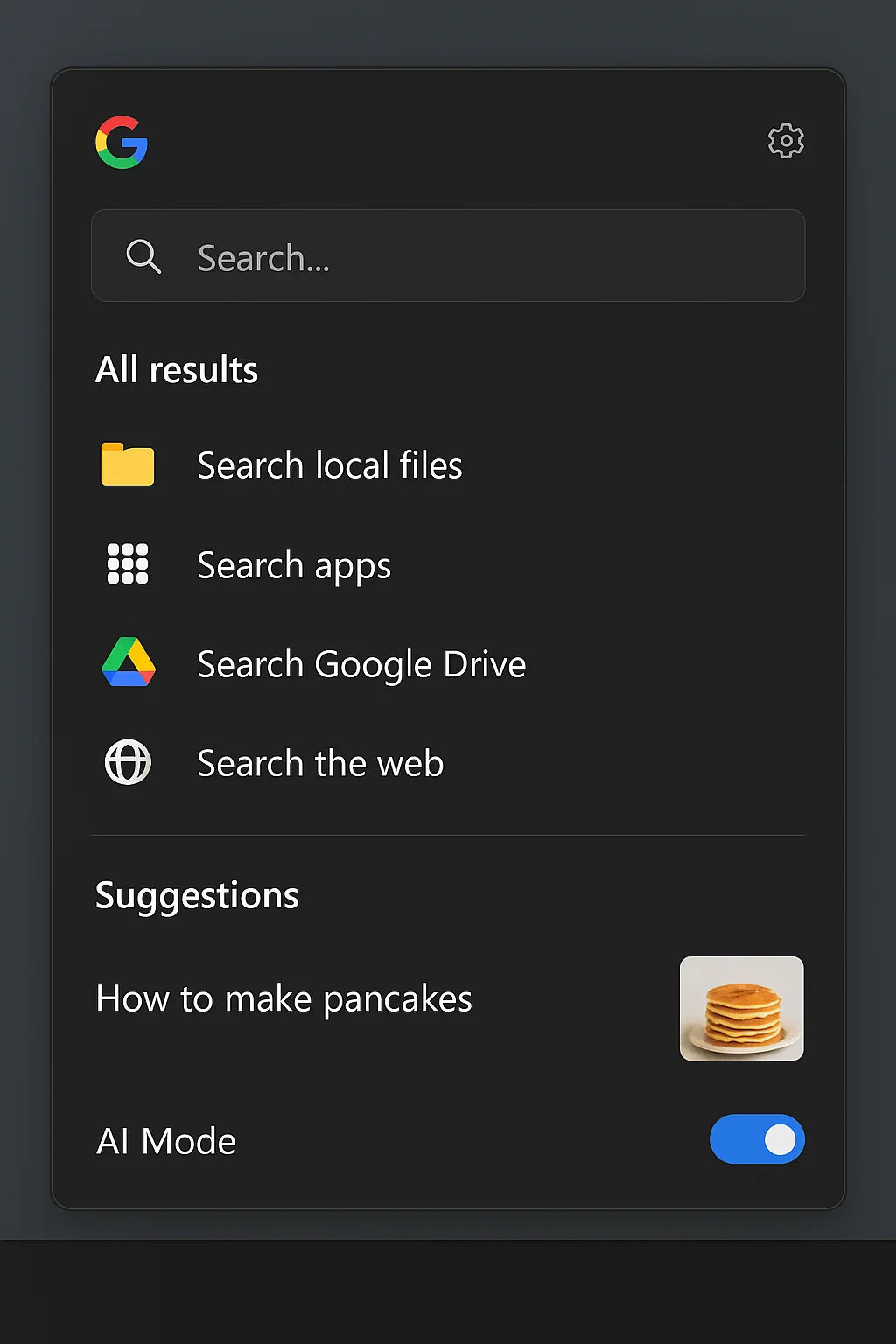
Codenamed “Google Spotlight” (a name that perfectly describes its ambition), the project appears to be a lightweight, always-ready desktop application for Windows. Its primary goal? To be the fastest way to find anything on your computer and the internet using Google’s powerful search technology.
Evidence of this project was first unearthed by eagle-eyed researchers at Windows Latest, who found strings of code within the Google Desktop application hinting at this new functionality. It’s not an official announcement, but it’s a strong signal of Google’s intent.
How It May Work: The Spotlight Experience on Windows
Based on the code snippets and Google’s existing ecosystem, here’s how we imagine the app will function:
1. Instant Activation
Like its macOS inspiration, you’ll likely summon the search bar with a global keyboard shortcut—perhaps Ctrl+Shift+G or a fully customizable key combo. This would float a clean, minimalist search bar in the center or top of your screen, ready for your query.
2. Blazing-Fast Local File Search
This is where Windows Search often falters. Google’s app would presumably index your files (documents, images, videos, apps) in the background, using a more efficient and reliable system than Windows’ native indexer. Expect to find files by name, type, and even content (searching for text inside PDFs and DOCX files) with Google-speed accuracy.
3. Deep Integration with Google’s Ecosystem
This is Google’s biggest advantage. The search won’t stop at your desktop. We expect deep, seamless integration with:
- Google Drive: Search your cloud files as if they were on your local machine.
- Gmail & Google Calendar: Find emails, events, and contacts without opening a tab.
- Chrome History & Bookmarks: Pull up websites you’ve visited or saved.
- Google Workspace (Docs, Sheets, Slides): Search the content of your online documents.
4. “Answer Engine” Capabilities
This is the real magic of Spotlight and what Google does best. You could use the search bar to:
- Calculate: Type
245 * 12and get the answer instantly. - Convert:
50 USD to EURor10 inches in cm. - Get Answers:
weather in Tokyoordefine serendipity. - Launch Actions:
send an email to [contact]orschedule a meeting.
5. Privacy and Data
The big question. Local file search would likely happen entirely on your device. For web queries and pulling data from your Google account, the app would need permissions and authentication. Google will have to be exceptionally transparent about what data is processed locally versus on its servers to gain users’ trust.
Why Is Google Doing This?
This move is strategic on multiple levels:
- The Assistant Gap: With Google Assistant’s presence on Windows being minimal, this app serves as a powerful alternative to both Windows Copilot and Alexa.
- Beyond the Browser: It further entrenches users into the Google ecosystem. If you can search your entire digital life—both online and offline—through a Google tool, you’re less likely to switch to Bing or DuckDuckGo.
- The Enterprise Play: For the millions of businesses that run on Google Workspace, a tool like this would be a productivity goldmine, making the Google-for-work package even more sticky and valuable.
Potential Challenges
- Windows Integration: Microsoft’s OS can be a walled garden. Achieving the deep system-level access needed for a truly seamless experience (like indexing every corner of the file system) might be a technical hurdle.
- Privacy Concerns: Users may be wary of giving Google, a company known for data collection, such deep access to their local files.
- Competition with Microsoft: Microsoft is heavily pushing its own AI-powered Windows Copilot. Google launching a competing desktop tool could lead to increased tensions or even restrictions from Microsoft.
The Bottom Line
Google testing a Spotlight-like search for Windows is a brilliant and logical move. It targets a genuine user pain point and leverages Google’s core competency: search.
If executed well, with a focus on speed, reliability, and user privacy, this could become an essential utility for Windows users everywhere. It wouldn’t just be a nice-to-have app; it could fundamentally change how we interact with our Windows PCs, making the process of finding information—any information—instantaneous and effortless.
This isn’t just about copying a Mac feature; it’s about Google planting its flag at the very heart of the Windows experience.
What do you think? Would you install a Google-powered Spotlight search on your Windows PC? Let us know in the comments below!